OpenClaw + CLIProxyAPI + ProxyPal: Dùng Nhiều AI Provider, Không Lo Token Limit
Hướng dẫn cài đặt và cấu hình OpenClaw kết hợp CLIProxyAPI và ProxyPal để dùng Claude, GPT-5, Gemini, Qwen cùng lúc — load balancing nhiều account, auto failover khi hết quota, và monitor token usage qua GUI desktop tiện lợi.
Một trong những điểm đau lớn nhất khi dùng AI agent cho công việc hàng ngày là token limit — đang giữa chừng task thì Claude hoặc GPT báo "rate limit exceeded" và phải chờ. Giải pháp: kết hợp CLIProxyAPI + ProxyPal với OpenClaw để chạy nhiều provider song song, tự động failover khi hết quota.
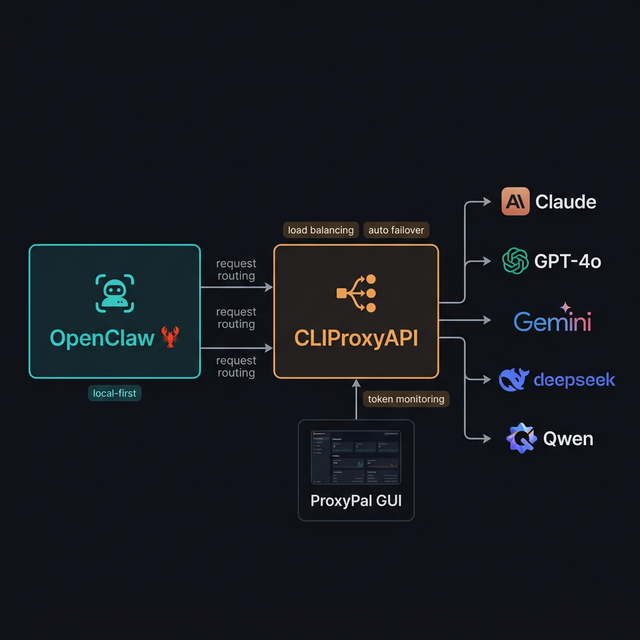
OpenClaw → CLIProxyAPI (port 8317) → Claude / GPT-5 / Gemini / Qwen — tự động chuyển provider khi hết quota
3 Thành Phần Trong Stack
1. OpenClaw 🦞
AI personal agent local-first — chạy task, kết nối Telegram/Discord, quản lý file, duyệt web. Đọc bài setup OpenClaw nếu chưa cài.
2. CLIProxyAPI
Proxy server mã nguồn mở (GitHub: router-for-me/CLIProxyAPI) — wrap các CLI AI agent (Claude Code, Gemini CLI, OpenAI Codex, Qwen Code, iFlow, Antigravity...) thành endpoint API tương thích chuẩn OpenAI/Gemini/Claude. Không cần API key riêng — dùng thẳng subscription OAuth đang có.
Tính năng chính:
- Cung cấp endpoint chuẩn OpenAI/Gemini/Claude cho tất cả CLI agent
- Round-robin load balancing nhiều account cùng provider
- Auto failover khi một provider/account bị rate limit
- OAuth authentication (không cần expose raw API key)
- Model mapping thông minh (vd:
claude-opus-4.5→claude-sonnet-4khi unavailable) - Port mặc định: 8317
Supported models (một phần):
gemini-3-pro-preview, gemini-2.5-pro, gpt-5, gpt-5-codex, claude-opus-4-1, claude-sonnet-4, qwen3-coder-plus, deepseek-v3.2, kimi-k2...
3. ProxyPal
Desktop GUI (GitHub: heyhuynhgiabuu/proxypal) — giao diện desktop bọc CLIProxyAPI, giúp bạn quản lý provider, xem token usage và request logs mà không cần chạm vào CLI.
Tính năng:
- Quản lý subscriptions: Claude, ChatGPT, Gemini, GitHub Copilot, Qwen, iFlow, Vertex AI
- GitHub Copilot Bridge
- Antigravity Support
- Usage analytics + token monitoring real-time
- Auto-detect và config CLI agents đã cài
- Works with: Cursor, Cline, Continue, Claude Code, OpenCode, bất kỳ OpenAI-compatible client
Cách Hoạt Động
Bạn nhắn Telegram → OpenClaw nhận → gửi request → CLIProxyAPI (:8317)
                                                         │
                               ┌─────────────────────────┤
                               ▼                         ▼
                         Claude Code CLI           GPT-5 Codex CLI
                         (primary)                (fallback 1)
                               │ rate limited?
                               ▼
                         Gemini CLI               Qwen Code CLI
                         (fallback 2)             (fallback 3)
CLIProxyAPI xử lý logic failover:
- Gửi request đến primary provider (Claude)
- Nếu bị rate limit → cooldown 1 phút → 5 phút → 25 phút → 1 giờ (cap)
- Tự động chuyển sang fallback tiếp theo trong danh sách
- Nếu billing issue → backoff 5 giờ, tăng gấp đôi mỗi lần, tối đa 24 giờ
- OpenClaw nhận kết quả — không cần biết provider nào đã xử lý
Cài Đặt CLIProxyAPI
CLIProxyAPI là binary Go — không phải npm package. Cài theo hệ điều hành:
macOS (Homebrew — khuyến nghị)
brew install cliproxyapi
brew services start cliproxyapi
Linux (One-click script)
curl -fsSL https://raw.githubusercontent.com/brokechubb/cliproxyapi-installer/refs/heads/master/cliproxyapi-installer | bash
Sau đó start service:
# Arch Linux (systemd):
systemctl --user start cli-proxy-api
systemctl --user enable cli-proxy-api   # auto-start on boot
Windows
Download binary mới nhất từ GitHub Releases và chạy trực tiếp.
Hoặc dùng EasyCLI GUI: router-for-me/EasyCLI/releases
Docker
docker run --rm -p 8317:8317 \
  -v /path/to/your/config.yaml:/CLIProxyAPI/config.yaml \
  -v /path/to/your/auth-dir:/root/.cli-proxy-api \
  eceasy/cli-proxy-api:latest
Build từ source
git clone https://github.com/router-for-me/CLIProxyAPI.git
cd CLIProxyAPI
go build -o cli-proxy-api ./cmd/server   # Linux/macOS
# hoặc:
go build -o cli-proxy-api.exe ./cmd/server  # Windows
Kiểm tra server đang chạy (port mặc định 8317):
curl http://localhost:8317/v1/models
Cài Đặt CLI Agents
Cài các CLI agent tương ứng với subscription bạn có (CLIProxyAPI cần chúng để proxy):
# Claude Code (Anthropic)
npm install -g @anthropic-ai/claude-code

# Gemini CLI (Google)
npm install -g @google/gemini-cli

# OpenAI Codex CLI
npm install -g @openai/codex
Sau khi cài, đăng nhập OAuth cho từng agent:
claude          # Claude Code — login theo wizard
gemini          # Gemini CLI — login Google account
codex           # OpenAI Codex — login OpenAI account
Cài ProxyPal (Desktop GUI)
Bước 1: Download từ GitHub Releases — có bản cho macOS (Apple Silicon & Intel), Windows, Linux (.deb).
Bước 2 (macOS): Nếu bị chặn vì app chưa ký certificate:
xattr -cr /Applications/ProxyPal.app
Bước 3: Mở ProxyPal → Start proxy → Kết nối các AI account (OAuth login).
Endpoint unified: http://localhost:8317/v1 — dùng URL này cho mọi client.
Cấu Hình OpenClaw Kết Nối CLIProxyAPI
OpenClaw dùng config JSON5 tại ~/.openclaw/openclaw.json. Cấu trúc đúng để trỏ về CLIProxyAPI:
// ~/.openclaw/openclaw.json
{
  agents: {
    defaults: {
      model: {
        primary: "anthropic/claude-sonnet-4-5",
        fallbacks: ["openai/gpt-5", "google-antigravity/gemini-2.5-pro"],
      },
      // (Tùy chọn) khai báo model aliases
      models: {
        "anthropic/claude-sonnet-4-5": { alias: "Sonnet" },
        "openai/gpt-5": { alias: "GPT-5" },
        "google-antigravity/gemini-2.5-pro": { alias: "Gemini" },
      },
    },
  },
  // Trỏ provider về CLIProxyAPI thay vì cloud API trực tiếp
  models: {
    mode: "merge",
    providers: {
      anthropic: {
        baseUrl: "http://localhost:8317/anthropic",
        api: "anthropic-messages",
      },
      openai: {
        baseUrl: "http://localhost:8317/openai",
        api: "openai-completions",
      },
      "google-antigravity": {
        baseUrl: "http://localhost:8317/gemini",
        api: "google-generative-ai",
      },
    },
  },
}
Giải thích các keys quan trọng:
agents.defaults.model.primary→ model dùng đầu tiên cho mỗi requestagents.defaults.model.fallbacks→ danh sách fallback theo thứ tự ưu tiênmodels.providers.*.baseUrl→ trỏ về CLIProxyAPI thay vì cloud API trực tiếpmodels.providers.*.api→ loại API adapter (openai-completions,anthropic-messages,google-generative-ai)
Reload config sau khi chỉnh:
openclaw gateway --port 18789  # restart gateway
# hoặc dùng hot reload qua Control UI tại http://127.0.0.1:18789
Cấu Hình Failover Nâng Cao
Điều Chỉnh Cooldown (trong openclaw.json)
{
  auth: {
    cooldowns: {
      billingBackoffHours: 5,      // Thời gian chờ đầu tiên khi billing issue
      billingMaxHours: 24,         // Thời gian chờ tối đa
      failureWindowHours: 24,      // Reset error counter nếu không fail trong khoảng này
    },
  },
}
| Key | Mặc định | Ý nghĩa |
|---|---|---|
billingBackoffHours | 5h | Backoff đầu tiên khi billing issue |
billingMaxHours | 24h | Thời gian chờ tối đa (cap) |
failureWindowHours | 24h | Reset đếm lỗi nếu không fail trong khoảng này |
Multi-Account Cùng Một Provider
Nếu bạn có 2 account Claude, OpenClaw round-robin giữa chúng tự động. Thông tin OAuth được lưu trong:
~/.openclaw/agents/<agentId>/agent/auth-profiles.json
Format (do OpenClaw tự ghi sau khi bạn login):
{
  "profiles": {
    "anthropic:account1@gmail.com": {
      "type": "oauth",
      "provider": "anthropic",
      "access": "...",
      "refresh": "...",
      "expires": 1736160000000,
      "email": "account1@gmail.com"
    },
    "anthropic:account2@gmail.com": {
      "type": "oauth",
      "provider": "anthropic",
      "access": "...",
      "refresh": "...",
      "expires": 1736160000000,
      "email": "account2@gmail.com"
    }
  }
}
Rotation order: Profile ID format là provider:email (vd: anthropic:user@gmail.com). OpenClaw rotate theo:
- Prioritize OAuth profiles trước API key profiles
- Oldest
lastUsedtrước — account ít dùng gần đây nhất được dùng tiếp - Profiles đang cooldown hoặc disabled bị đẩy xuống cuối
Thêm Account Mới (CLI)
# Login thêm account Claude:
openclaw onboard --auth-choice anthropic-oauth

# Login Gemini (Antigravity):
openclaw onboard --auth-choice google-antigravity

# Login OpenAI Codex:
openclaw onboard --auth-choice openai-oauth
Monitor Qua ProxyPal GUI
Sau khi setup xong, mở ProxyPal để xem:
- Dashboard: request count / token usage real-time
- Provider Status: màu xanh (active), vàng (cooldown), đỏ (billing issue)
- Request Logs: từng request được route đến provider nào, response time, status
- Usage Analytics: token consumption theo ngày/tuần/model, estimated savings
Không cần gõ lệnh CLI — tất cả visible qua GUI desktop.
Use Case Thực Tế: "Always-On Agent"
Kịch bản: Bạn có Claude Pro ($20/month) và ChatGPT Plus ($20/month). Thay vì bị block khi một bên hết quota trong giờ cao điểm, setup này tự động phân phối load:
Sáng (8-12h): Claude xử lý phần lớn request
12h: Claude bị rate limit
           ↓ auto failover (1 phút cooldown)
12h-14h: GPT-5 takes over
14h: Claude cooldown reset
           ↓ trở lại Claude
14h-18h: Round-robin giữa 2 provider
Kết quả: Không có downtime, agent luôn phản hồi, effective token capacity gần như nhân đôi.
Lưu Ý Quan Trọng
- CLIProxyAPI cần CLI agents tương ứng đã được đăng nhập OAuth session active trước khi start
- Không expose CLIProxyAPI ra internet — chỉ
localhosthoặc qua Tailscale nếu cần remote access - Nếu dùng ProxyPal, đảm bảo CLIProxyAPI service đang chạy (
brew services list) trước khi OpenClaw start - Port 8317 là mặc định — nếu thay đổi trong CLIProxyAPI config, update
baseUrltrongopenclaw.jsontương ứng
Tài Nguyên
- 🦞 OpenClaw: github.com/openclaw/openclaw | Docs: docs.openclaw.ai
- 📡 CLIProxyAPI: github.com/router-for-me/CLIProxyAPI | Guide: help.router-for.me
- 🖥️ ProxyPal: github.com/heyhuynhgiabuu/proxypal
- 📚 OpenClaw Model Failover: docs.openclaw.ai/concepts/model-failover
- 📚 OpenClaw Custom Providers: docs.openclaw.ai/gateway/configuration-reference#custom-providers-and-base-urls