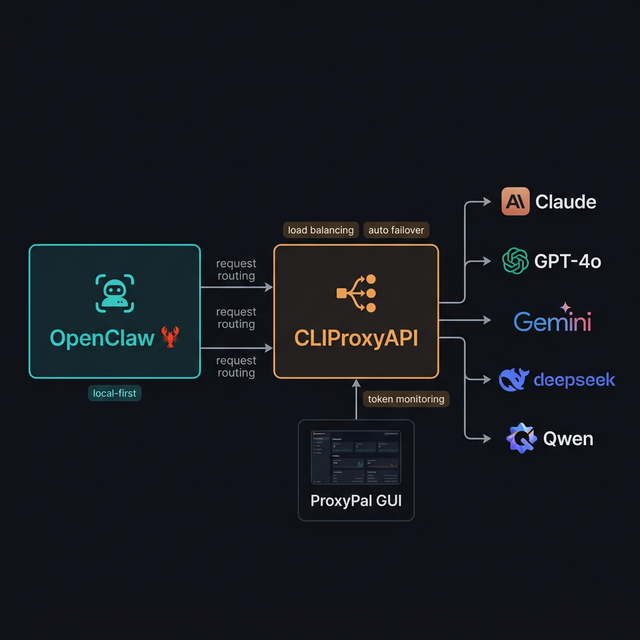
OpenClaw + CLIProxyAPI + ProxyPal: Use Multiple AI Providers, Never Hit Token Limits Again
A step-by-step guide to setting up OpenClaw with CLIProxyAPI and ProxyPal to run Claude, GPT-5, Gemini, and Qwen simultaneously — with round-robin load balancing, automatic failover on rate limits, and a desktop GUI for token monitoring.
One of the biggest pain points when using AI agents for daily work is token limits — mid-task, Claude or GPT throws a "rate limit exceeded" error and you're stuck waiting. The solution: combine CLIProxyAPI + ProxyPal with OpenClaw to run multiple providers in parallel with automatic failover when quota is exhausted.
OpenClaw → CLIProxyAPI (port 8317) → Claude / GPT-5 / Gemini / Qwen — automatically switches provider when quota is hit
The 3 Components
1. OpenClaw 🦞
Local-first AI personal agent — runs tasks, connects to Telegram/Discord, manages files, browses the web. Read the OpenClaw setup guide if you haven't installed it yet.
2. CLIProxyAPI
An open-source proxy server (GitHub: router-for-me/CLIProxyAPI) that wraps CLI AI agents (Claude Code, Gemini CLI, OpenAI Codex, Qwen Code, iFlow, Antigravity...) and exposes them as API endpoints compatible with the OpenAI/Gemini/Claude standard. No separate API keys needed — it uses your existing OAuth subscriptions.
Key features:
- Unified OpenAI/Gemini/Claude-compatible endpoints for all CLI agents
- Round-robin load balancing across multiple accounts for the same provider
- Auto failover when a provider/account hits rate limits
- OAuth authentication (no raw API key exposure)
- Smart model mapping (e.g.,
claude-opus-4.5→claude-sonnet-4when unavailable) - Default port: 8317
Supported models (partial list):
gemini-3-pro-preview, gemini-2.5-pro, gpt-5, gpt-5-codex, claude-opus-4-1, claude-sonnet-4, qwen3-coder-plus, deepseek-v3.2, kimi-k2...
3. ProxyPal
A desktop GUI app (GitHub: heyhuynhgiabuu/proxypal) that wraps CLIProxyAPI with a clean interface for managing providers, viewing token usage, and monitoring request logs — no CLI needed.
Features:
- Manage subscriptions: Claude, ChatGPT, Gemini, GitHub Copilot, Qwen, iFlow, Vertex AI, and custom OpenAI-compatible endpoints
- GitHub Copilot Bridge
- Antigravity Support
- Usage analytics + real-time token monitoring
- Auto-detects and configures installed CLI agents
- Works with: Cursor, Cline, Continue, Claude Code, OpenCode, and any OpenAI-compatible client
How It Works
You message Telegram → OpenClaw receives → sends request → CLIProxyAPI (:8317)
                                                                 │
                                    ┌───────────────────────────┤
                                    ▼                           ▼
                              Claude Code CLI              GPT-5 Codex CLI
                              (primary)                   (fallback 1)
                                    │ rate limited?
                                    ▼
                              Gemini CLI                  Qwen Code CLI
                              (fallback 2)                (fallback 3)
CLIProxyAPI failover logic:
- Sends request to primary provider (Claude)
- If rate limited → cooldown ladder: 1 min → 5 min → 25 min → 1 hour (cap)
- Automatically switches to next fallback in the list
- If billing issue → 5-hour backoff, doubling per failure, capping at 24 hours
- OpenClaw receives the result — unaware of which provider handled it
Installing CLIProxyAPI
CLIProxyAPI is a Go binary — not an npm package. Install according to your OS:
macOS (Homebrew — recommended)
brew install cliproxyapi
brew services start cliproxyapi
Linux (One-click installer script)
curl -fsSL https://raw.githubusercontent.com/brokechubb/cliproxyapi-installer/refs/heads/master/cliproxyapi-installer | bash
Then manage the service:
# Arch Linux (systemd):
systemctl --user start cli-proxy-api
systemctl --user enable cli-proxy-api   # auto-start on boot
Windows
Download the latest binary from GitHub Releases and run it directly.
Or use the EasyCLI desktop GUI: router-for-me/EasyCLI/releases
Docker
docker run --rm -p 8317:8317 \
  -v /path/to/your/config.yaml:/CLIProxyAPI/config.yaml \
  -v /path/to/your/auth-dir:/root/.cli-proxy-api \
  eceasy/cli-proxy-api:latest
Build from Source
git clone https://github.com/router-for-me/CLIProxyAPI.git
cd CLIProxyAPI
go build -o cli-proxy-api ./cmd/server        # Linux/macOS
# or:
go build -o cli-proxy-api.exe ./cmd/server    # Windows
Verify the server is running (default port 8317):
curl http://localhost:8317/v1/models
Install CLI Agents
Install the CLI agents for the subscriptions you have (CLIProxyAPI needs these to proxy through):
# Claude Code (Anthropic)
npm install -g @anthropic-ai/claude-code

# Gemini CLI (Google)
npm install -g @google/gemini-cli

# OpenAI Codex CLI
npm install -g @openai/codex
Then log in via OAuth for each agent:
claude         # Claude Code — follow login wizard
gemini         # Gemini CLI — log in with Google account
codex          # OpenAI Codex — log in with OpenAI account
Install ProxyPal (Desktop GUI)
Step 1: Download from GitHub Releases — available for macOS (Apple Silicon & Intel), Windows, and Linux (.deb).
Step 2 (macOS): If macOS blocks the app (not signed with Apple Developer certificate yet):
xattr -cr /Applications/ProxyPal.app
Step 3: Open ProxyPal → Start proxy → Connect your AI accounts (via OAuth login).
Unified endpoint for all clients: http://localhost:8317/v1
Configure OpenClaw to Use CLIProxyAPI
OpenClaw uses a JSON5 config file at ~/.openclaw/openclaw.json. The correct structure to point OpenClaw to CLIProxyAPI:
// ~/.openclaw/openclaw.json
{
  agents: {
    defaults: {
      model: {
        primary: "anthropic/claude-sonnet-4-5",
        fallbacks: ["openai/gpt-5", "google-antigravity/gemini-2.5-pro"],
      },
      // (Optional) define model aliases for /model command in chat
      models: {
        "anthropic/claude-sonnet-4-5": { alias: "Sonnet" },
        "openai/gpt-5": { alias: "GPT-5" },
        "google-antigravity/gemini-2.5-pro": { alias: "Gemini" },
      },
    },
  },
  // Point providers to CLIProxyAPI instead of cloud APIs directly
  models: {
    mode: "merge",
    providers: {
      anthropic: {
        baseUrl: "http://localhost:8317/anthropic",
        api: "anthropic-messages",
      },
      openai: {
        baseUrl: "http://localhost:8317/openai",
        api: "openai-completions",
      },
      "google-antigravity": {
        baseUrl: "http://localhost:8317/gemini",
        api: "google-generative-ai",
      },
    },
  },
}
Key fields explained:
agents.defaults.model.primary→ model used first for every requestagents.defaults.model.fallbacks→ ordered list of fallback modelsmodels.providers.*.baseUrl→ points to CLIProxyAPI instead of the cloud API directlymodels.providers.*.api→ API adapter type (openai-completions,anthropic-messages,google-generative-ai)
After editing, reload the gateway:
openclaw gateway --port 18789   # restart gateway
# or use hot reload via Control UI at http://127.0.0.1:18789
Advanced Failover Configuration
Adjust Cooldown Timings (in openclaw.json)
{
  auth: {
    cooldowns: {
      billingBackoffHours: 5,      // Initial wait when billing issue occurs
      billingMaxHours: 24,         // Maximum wait time cap
      failureWindowHours: 24,      // Reset error counter if no failure in this window
    },
  },
}
| Key | Default | Meaning |
|---|---|---|
billingBackoffHours | 5h | Initial backoff on billing failure |
billingMaxHours | 24h | Maximum backoff cap |
failureWindowHours | 24h | Resets error count if no failures in this window |
Multi-Account for the Same Provider
If you have 2 Claude accounts, OpenClaw automatically round-robins between them. OAuth credentials are stored in:
~/.openclaw/agents/<agentId>/agent/auth-profiles.json
This file is managed by OpenClaw (written automatically after OAuth login). Format:
{
  "profiles": {
    "anthropic:account1@gmail.com": {
      "type": "oauth",
      "provider": "anthropic",
      "access": "...",
      "refresh": "...",
      "expires": 1736160000000,
      "email": "account1@gmail.com"
    },
    "anthropic:account2@gmail.com": {
      "type": "oauth",
      "provider": "anthropic",
      "access": "...",
      "refresh": "...",
      "expires": 1736160000000,
      "email": "account2@gmail.com"
    }
  }
}
Rotation order: Profile IDs use provider:email format (e.g., anthropic:user@gmail.com). OpenClaw rotates:
- OAuth profiles before API key profiles
- Oldest
lastUsedfirst — least recently used account goes next - Profiles in cooldown or disabled state are pushed to the end, ordered by soonest expiry
Adding More Accounts (CLI)
# Add another Claude account:
openclaw onboard --auth-choice anthropic-oauth

# Add Gemini (Antigravity):
openclaw onboard --auth-choice google-antigravity

# Add OpenAI Codex:
openclaw onboard --auth-choice openai-oauth
Monitoring via ProxyPal GUI
Once set up, open ProxyPal to see:
- Dashboard: request count and token usage in real-time
- Provider Status: green (active), yellow (cooldown), red (billing issue)
- Request Logs: which provider handled each request, response time, status code
- Usage Analytics: token consumption by day/week/model, estimated savings
No CLI commands needed — everything visible through the desktop GUI.
Real-World Use Case: "Always-On Agent"
Scenario: You have Claude Pro ($20/month) and ChatGPT Plus ($20/month). Instead of getting blocked when one hits its quota during peak hours, this setup automatically distributes load:
Morning (8am-12pm): Claude handles most requests
12pm: Claude hits rate limit
             ↓ auto failover (1 min cooldown)
12pm-2pm: GPT-5 takes over
2pm: Claude cooldown resets
             ↓ back to Claude
2pm-6pm: Round-robin between both providers
Result: Zero downtime, the agent always responds, and your effective token capacity is nearly doubled.
Important Notes
- CLIProxyAPI requires the corresponding CLI agents to be logged in (OAuth session active) before starting
- Do not expose CLIProxyAPI to the internet — keep it on
localhostor use Tailscale for secure remote access - If using ProxyPal, make sure CLIProxyAPI service is running (
brew services liston macOS) before starting OpenClaw - Port 8317 is the default — if you change it in CLIProxyAPI config, update the
baseUrlvalues inopenclaw.jsonaccordingly
Resources
- 🦞 OpenClaw: github.com/openclaw/openclaw | Docs: docs.openclaw.ai
- 📡 CLIProxyAPI: github.com/router-for-me/CLIProxyAPI | Guide: help.router-for.me
- 🖥️ ProxyPal: github.com/heyhuynhgiabuu/proxypal
- 📚 OpenClaw Model Failover: docs.openclaw.ai/concepts/model-failover
- 📚 OpenClaw Custom Providers: docs.openclaw.ai/gateway/configuration-reference#custom-providers-and-base-urls