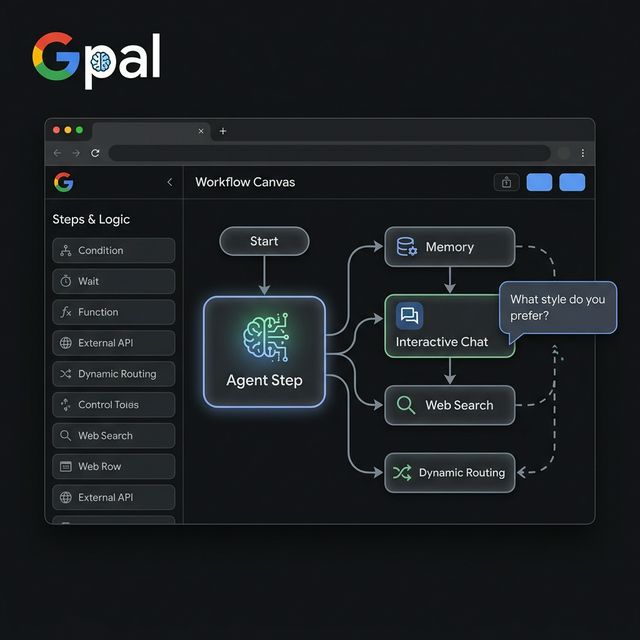
Google Opal Agent Step — From Rigid AI Workflows to Genuinely Flexible Agents
Google Labs launched the agent step in Opal in February 2026, transforming AI workflows from fixed step chains into interactive, adaptive experiences. Analysis of 3 new capabilities (Memory, Dynamic Routing, Interactive Chat) and how builders can use them practically.
Google Opal Just Made AI Workflows Less Rigid
On February 24, 2026, Google Labs launched the agent step in Opal — a change that shifts AI workflows from fixed step sequences to genuinely interactive experiences.
Previously, creating an Opal meant predefining everything: how many steps, what questions to ask users, which model to use for each step. This static approach works well for predictable processes but breaks the moment real-world situations are more complex than the preset script.
With the agent step, you no longer specify every step. Instead, you define the goal — the agent determines the best way to reach it, calls the right tools and models, and can ask users follow-up questions when it needs more information.
This is part of a larger wave: from fixed automations to agentic workflow systems — and Opal is Google's clearest example of that direction.
Before and After the Agent Step
Before: The Interior Design Opal worked like a straight pipeline: upload photo → choose style → receive redesigned image. One path, no branches, no interaction.
After: The Room Styler Opal becomes a "design partner": the agent understands your goal, asks follow-ups when needed, researches niche sub-styles if you want something unusual, generates images, receives feedback, and refines.
The core difference: from "you follow the workflow" to "the workflow works with you."
The 3 New Capabilities of the Agent Step
1. Memory — Remembers Across Sessions
The agent step can store information between uses: user names, style preferences, running lists, brand identity.
Why this matters for builders:
No more re-entering context every session. The Video Hooks Brainstormer Opal (Google's example) stores brand identity and content preferences — the next time you open the Opal, it already knows who you are and what you need.
For content creators: instead of "reminding the AI about brand voice every morning," the agent simply remembers.
Practical use cases:
- Research assistant that remembers topic preferences → no re-briefing each session
- Content ideation tool that remembers brand guidelines → more consistent output
- Internal team tool that remembers project context → shorter prompts
2. Dynamic Routing — Automatically Selects Paths
You define multiple paths and routing criteria in natural language. The agent selects the correct path when conditions are met.
Google's example: Executive Briefing Opal handles meetings differently based on client type:
- Existing client: agent reviews internal meeting notes, summarizes historical context
- New client: agent searches the web for background information
This is conditional logic — but instead of coding "if new client else existing client," you describe it in English and the agent handles the rest.
When to use dynamic routing:
- Workflows with diverse user personas
- Tasks that depend on data not known before the workflow starts
- Processes with natural branches based on context
When NOT to use it:
- Compliance-sensitive flows requiring clear audit trails
- Fully deterministic operations
- High-volume repeat automations with no variation needed
3. Interactive Chat — Ask Before Acting
The agent can proactively ask users for missing information, or offer choices before proceeding to the next stage.
Example: If a user's description is too vague, the Room Styler Opal asks: "Do you want warm or cool tones?" or shows examples for the user to choose — rather than guessing and generating the wrong output.
Why this matters more than it sounds:
Most AI workflow failures aren't caused by weak models — they're caused by incomplete input. Interactive chat solves the "garbage in, garbage out" problem at the source.
Practical Use Cases for Builders
| Use Case | Key Capability |
|---|---|
| AI content briefing workflow | Interactive chat collects brief + Memory stores brand voice |
| Lead qualification agent | Dynamic routing based on lead type |
| Internal research assistant | Memory + Web Search |
| Product marketing brainstorm | Memory stores product context |
| Client onboarding helper | Interactive chat + Dynamic routing (new vs returning) |
| Image/video ideation | Interactive chat + model selection |
Where Opal Fits — and Where It Doesn't
Google's agent step is a clear signal about where AI workflow tools are headed. But that doesn't mean every workflow should use an agent step.
Fixed steps are still better when:
- The process is fully pre-defined (e.g., auto-format file, extract data)
- Compliance requires every decision to be traceable
- High-volume, repeat automations with no variation needed
Agent steps are better when:
- Discovery phase — you don't know exactly what the user wants upfront
- Personalization — output depends on specific user context
- Multi-turn interactions — need to ask questions before executing
- Ambiguous requests — multiple interpretations are all valid
Evaluation Checklist: Which Workflow Tool Fits?
When choosing an agentic workflow tool in 2026, ask:
- Does it support memory?
- Does it expose tool use (web search, external APIs)?
- Can the agent ask clarifying questions?
- Can you inspect routing decisions?
- Can you blend fixed steps with dynamic ones?
- Is handoff to human review straightforward?
Opal currently checks most of these boxes — and with the agent step, it begins checking observability and routing inspection as well.
Takeaway
The Opal agent step matters not because Google released a new feature. It matters because it reflects how AI workflow tools are being forced to evolve.
Hybrid systems will win: Not "agents replacing automation" but "agents combined with structured steps, flexibly." Builders who learn to design hybrid workflows — knowing when to use tight constraints, when to allow agent flexibility — will have a clear advantage over those who only know one model.
Source: Build dynamic agentic workflows in Opal — Google Labs Blog, February 24, 2026